0 Introduction
Python Statement
The python statement are the building blocks of Python programs, that either be as
- Sequence: a number of statement that in a line
- Condition: decision on what to do
- Loop/Repetition: repeat a certain activities
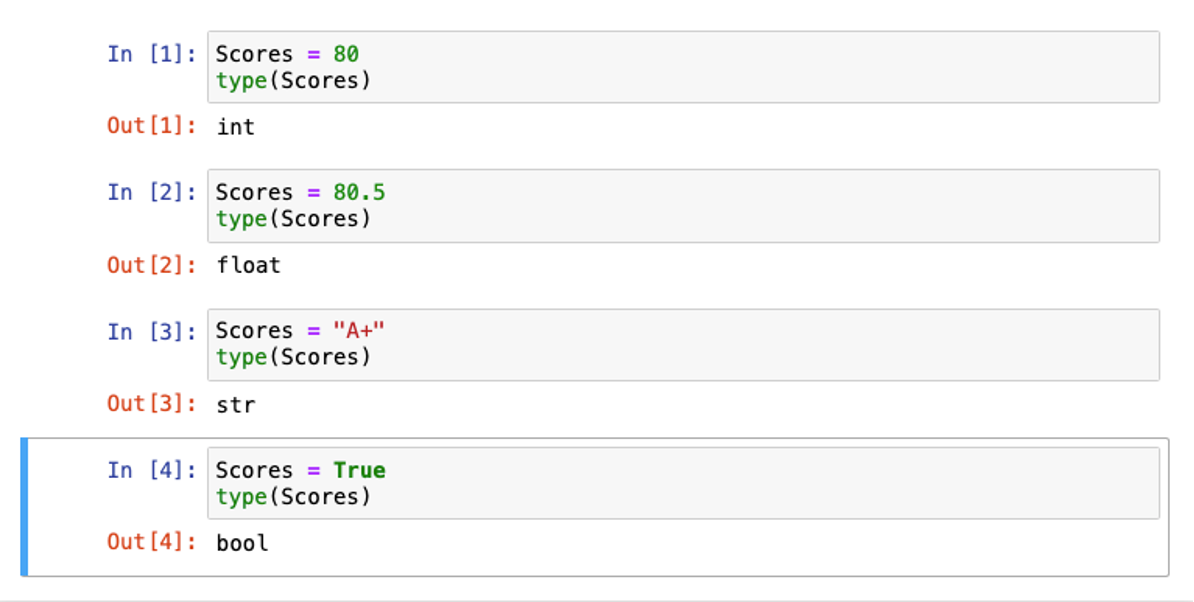
Python Data Types
- Numeric: integer and float
- String: a line of text
- Boolean: True or False
Note that the Python could decides the data types as the codes go. It maybe annoying, so we can force Python to change the type.
Hint: use type() to check the data types:
The first simple function we learn, is print()
print("The answer is", 6+7,"!")The implied meaning of it is:
print(value1, value2, value3)Deal with Errors
Make sure bad program inputs cannot crash the program.
If we don’t want the program to be stop when we face some error, we could use try except function, for example:
try:
	print(x)
except NameError:
	print('oops.an NameError occured')
x = 1
print(x)
Variables
We can store the result of an expression in a variable.
Naming of Variables:
It is better to describe the purpose of the variable, outcome is always better than a simply o .
Don’t use reserved Python words, such as print, while and so on.
variable = expression # The form of statementNote: the = sign is not for comparison, such as if x = a is not correct, if x == a is correct.
Arithmetic
Precedence
The precedence of Python is similar to the algebra in math:
Parenthesis > Exponent > Multiply/Divide > Add/Subtract
Mix the numeric types:
If we mix an integer number and floating number together, we would get a floating number.
7 + 4.0 # 11.0Powers
The ** are used in calculate an exponent
x**2 is exactly in Python.
Floor Division
7 / 4 # 1.75 (float)

7 //4 # 1 (integer)

7 % 4 # 3 (the remainder)
Tricky Part: when n = 1729, -n // 10 would get the result of -173, because -173 is the largest integer that less than -172.9. The result is not -172.
| Operator | Description | Example |
|---|---|---|
| () | Parenthesis for grouping | (2 + 3) |
| ** | Exponential function | 2 ** 3 |
| * | Multiplication | 2 * 3.4 |
| / | Division | 3.6/1.2 |
| // | Integer Division | 5 // 2 |
| % | Reminder | 5%2 |
| + | Addition | 1.45 + 2.8 |
| - | Subtraction | 5.8 - 2.579 |
8.25 Lecture 3
Deal with the error:
try:
	statement
except:
	statement
For example:
try:
	print(z)
except SyntaxError:
	print("oops. an SyntaxError occured")
except:
	print("oops. an SyntaxError occured")
	raise
z = 1
print(z)
For more information, could refer to: Python raise用法(超级详细,看了无师自通) (biancheng.net)
The function of raise is to “raise” the error.
Also, you could use the int() to convert the data type. For example:
balance = total + tax   # balance: float
dollars = int (balance) # dollars: integer
The round off problem
When we type:
price = 4.35
b = 100
total = price * b
print(total)
It would output the result 4.39999999. How to solve it? Use the function round()
price = 4.35
b = 100
total = round(price * b)
print(total)
Then it would be 435
Warning: Do not use
int()because it will only keep the integer part
8.29 Lecture 4
Review
Assign a variable: variable = expression, remember do not use the % or ? to assign it.
The function %whos , to show all the self-defined variables.
The arithmetic operators and some built-in functions and so on are also useful. Some math module can be also used (but have to from math import sqrt)
Some interesting things:
print(-9//5)It would print -2
Strings
See some explanation about Strings in Sequence Functions
String Length
length = len("World!")
print(length)
It is 6, (do not count "")
We use the str to convert between numbers and strings.
How to copy a character from a string?

We set this string to be ‘name’
start = name[0]Escape Sequences
print("He said\"Hello\"")To provide a double quote. Similarly, if you want to print a \, just need to add a \, which is
print("\"C:\\Temp\\Secret.txt\"")Input and Output
How to separate? Use sep=
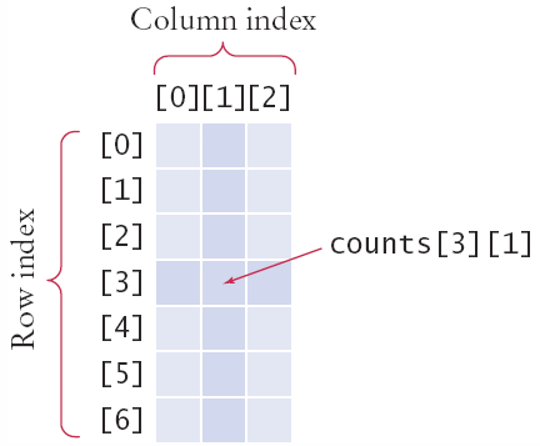
print("Hello","World","Cheer",sep=" ")Accessing Elements
How about the two index values?
medalcount = counts[3][1]
Dictionaries in Python
How to create a dictionary? Use contacts = {"fred":12345,"Mary":32323}
Practical operations:
len(d) would give you the number of key: value pairs.
d[key1] = value1 if key1 is already a key in the dictionary, changes the value that originally belongs to key1 to be value1, if no key1 exists, just add the pair.
The key difference is that you can’t access the dictionary values like what you do in the list. You can only use key to access them.
# prints 7235591
print("Fred's number is",
	 contacts["Fred"])
Use xxx["yy"] to add or modify items.
Review Class
String
str1 = '12345'
# Change the letter case of the string, i.e. lower to upper, upper to lower
# Q1
input_string =
会把 dictionary 变成 dataframe,会变成什么?变了之后会继续怎么变?
一定要非常注意缩进!